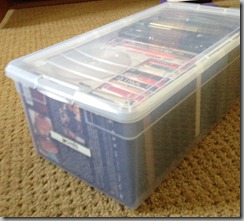
Favorite Container #2: Media Storage Box

February 12, 2013 17:44 by elizabeth

Here in the Boston area we are still digging out from last weekend’s blizzard that dumped 2 to 3 feet of snow. With two snow days off from school, we ended up with a long weekend. In between shoveling and sledding we watched a lot of movies!IMG_0143

Watching movies is the inspiration for my Favorite Container for February: clear media storage boxes.

This great storage box comes from The Container Store. It’s clear, sturdy and stackable. It’s easy to look right through the top and find just the right movie. It also slides out of the cabinet, so I’m not shifting through lots of loose DVD boxes looking for what I want.

At first I was skeptical that I needed a box made for media, but it is the perfect size – with no wasted space. Once I had one box it worked so well, I had to get some more. We’ve now used these boxes to organize all our DVDs and games in our family TV room.

Your Turn: Can you find movies when you need them? If not, it may be time to get them organized. With all the on-demand options for watching movies now, be sure you are only keeping movies that you really watch and enjoy!  And finally, don’t even think about keeping VCR tapes unless you still have a working VCR.

Favorite Finds Part 1: Products for Paper Piles

April 4, 2012 21:56 by elizabeth

Here are my favorite finds from the National Association of Professional Organizers Conference for dealing with paper:

WallMates – From At-A-Glance®, these self-adhesive dry erase surfaces turn any wall or flat surface into an area for your to do list, goals, or whatever you need to jot down. WallMates are repositionable, don’t damage your walls (or office furniture) and come blank or with a monthly calendar outline. Thinking beyond the office, this could be a 87001egreat place for important notes in a kitchen or mudroom.

Bring some more organization to your projects or paper piles with the Stackit™ organizers from Smead . These folders hold papers vertically, with three tabbed sections and a flap.

If you are ready to go paperless, check out the NeatDesk® Scanner from NeatReceipts®. This scanner has separate slots for scanning business cards, receipts, and regular 8x11 documents…all at the same time! And the software knows to put business card information into contacts (synchs with Outlook for example), receipts into one folder, and documents into a third folder.

Categories:   Tips | Tech | Paper | Office
Actions:   E-mail | Permalink | Comments (1) | Comment RSSRSS comment feed

Organizing in the Kitchen: What are your online tools?

October 25, 2011 12:23 by elizabeth

MP900175492[1]Say the phrase “kitchen tools” and you probably think of a stand mixer, chef knife, or set of measuring cups.  But what online tools have you tried?

As a busy parent, I know that finding the time to plan meals, shop, and cook can be a challenge. Here are a few online tools I've tried to save time:

  • Online grocery delivery: When I lived in an apartment and couldn’t carry bags of groceries home I regularly ordered my groceries online. Now I use the deliveries when my schedule is too hectic. A busy mom friend says this service saves her every week, especially with store app for smartphones. Her basic shopping list is always ready to go.
  • Recipes online: I use websites to find the perfect birthday cake for my party theme, or to discover a new way to cook Brussels sprouts. My sister also uses Pinterest to “pin” her favorite recipes from the web, allowing her not only to have the recipe but also a photo of the dish.
  • Cooking magazines online: In my home we love Cook’s Illustrated and subscribe online so that we can find any recipe we need, any time. Now we don’t have to search through all the magazines to find that dessert we wanted to try. My husband loves their app for the iPad too.

I have been telling parents about The 6 o’clock Scramble website. Subscribe and you’ll receive weekly meal plans with shopping lists and healthy eating tips! I haven’t tried it yet but it looks like it could be a huge help.

What online tools have you tried to make it easier to get meals on the table?

Categories:   Kitchen | Tech | Time Management
Actions:   E-mail | Permalink | Comments (0) | Comment RSSRSS comment feed

Email Organization: 1-2-3

December 14, 2010 14:46 by elizabeth

Recently I wrote about how to deal with the catalogs coming into your home at this time of year.  After that post I noticed that my email was also getting quickly filled with shopping “deals” and offers.  While my catalogs were under control, my email box wasn’t.

I realized I could apply some of the same tips for dealing with catalog clutter to organizing my email:

  1. 1.  Using outlook rules, I set many of my retailer emails to go to a specific folder called “shopping”; now they don’t take up space in my in box and distract me from other tasks at hand. (Another idea I’ve heard: use a separate email address for retailer emails to keep them out of your work or main email box.)
  2. 2. When I review the emails I delete any I know I’m not going to use right away. I can also quickly scan my new “shopping” folder and delete all the emails at once if I want.  
  3. 3. Even better still, I took myself off several retailer email lists that I just never purchase from.

How do you keep your email in box in control? Post your tips in the comments.

Categories:   Office | Tech | Time Management | Tips
Actions:   E-mail | Permalink | Comments (0) | Comment RSSRSS comment feed

Make a Resolution to Back Up Your Data in 2010!

January 11, 2010 20:12 by elizabeth

I had a really fun experience while visiting my mom over the holidays: we pulled out a number of old photo albums and I was able to show my daughter what Christmas was like when I was a little girl. As I was uploading my new holiday photos onto my computer, I wondered how she would be able to do this with her children someday. 

I love my digital camera and take a lot more pictures than I used to.  However, all of this convenience comes with some responsibility: you now need to make sure none of these memories are lost. I was reminded of the importance of this when my niece recently lost all of the photos from her first trip to Paris when the hard drive she had stored them on failed. Sadly, she did not have them backed up on any other device, so they were gone for good. In order to make sure your pictures (and other data) are safe and sound, you need a plan for data backup and recovery.

So in 2010, resolve to back up! To get started, here’s a guest post from Ian, my favorite “tech guy” (and husband).

The first step in creating a backup plan is making sure that it is painless. The more difficult it is to back up your data, the less likely you're going to do it consistently. Fortunately, there are many solutions available such as Time Machine if you have a Macintosh, or a Windows Home Server if you are backing up multiple Windows systems at home. Programs like these will automatically copy your data to another storage device (typically, another hard drive) automatically every night. They are pretty fool proof and you will be guarded against the possibility that the hard drive on your main system fails.

If you're doing something like this already, congratulations! You're doing much more than most, and this is a great first step towards guarding your digital life.  However, have you considered what would happen to your data in the event of a catastrophic event, such as a fire or a robbery?  Your photo albums aren't attractive items for thieves, but your laptop is. In our house, we've taken an additional step and have purchased an off-site backup service through a company named Mozy. For $4.95 per month, Mozy makes a complete backup of a single system's data every night while you're sleeping. Mozy also gives you the ability to recover any of the last 30 days worth of backups, so if you realize you deleted a file accidentally in the last month, you have the ability to recover it. Mozy also has a "try it before you buy it" policy, you can sign up for a free 2GB account to make sure you're comfortable with the service before trusting them with your backup. There are many other comparable services available, here is a link to a review of online storage services if you want to look at the other options available.

My backup plan really gives me piece of mind that I will be able to pass on my digital memories to my daughter. This year, resolve to back up your memories, and you’ll be able to enjoy them for years to come!

Ian Goodsell is a Senior Software Engineer by day, and tech guy for That’s Neat! Organizing by night. Check out his ramblings about technology and life at http://blog.iangoodsell.com/.

Categories:   Products | Tips | Tech
Actions:   E-mail | Permalink | Comments (0) | Comment RSSRSS comment feed